Four Jobber datasets
Sync supported Clients, Jobs, Quotes and Invoices into dedicated Google Sheets tabs.
Remove the repetitive export-and-paste routine while keeping the spreadsheet tools your team already knows. Jobber Sync handles supported datasets, destination tabs, mapping, filters, history and saved configurations from one focused add-on.
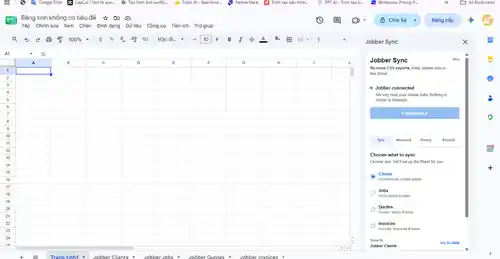
Sync supported Clients, Jobs, Quotes and Invoices into dedicated Google Sheets tabs.
Inspect rows before writing, map destination columns and filter the records you need.
Reuse recurring configurations and inspect recent sync activity.
Managed writes are designed to preserve user-owned formulas and custom columns.
Paid plans can keep supported Sheets current without repeated manual exports.
The integration reads supported Jobber data for reporting and does not write changes back to Jobber.
| Capability | Free | Pro | Business |
|---|---|---|---|
| Clients | Yes | Yes | Yes |
| Jobs, Quotes, Invoices | — | Yes | Yes |
| Manual sync | Yes | Yes | Yes |
| Hourly auto-refresh | — | Yes | Yes |
| Saved setups | 1 | 5 | 25 |
Free manual Clients sync works without a Resonlix account. Create one only when you upgrade.